

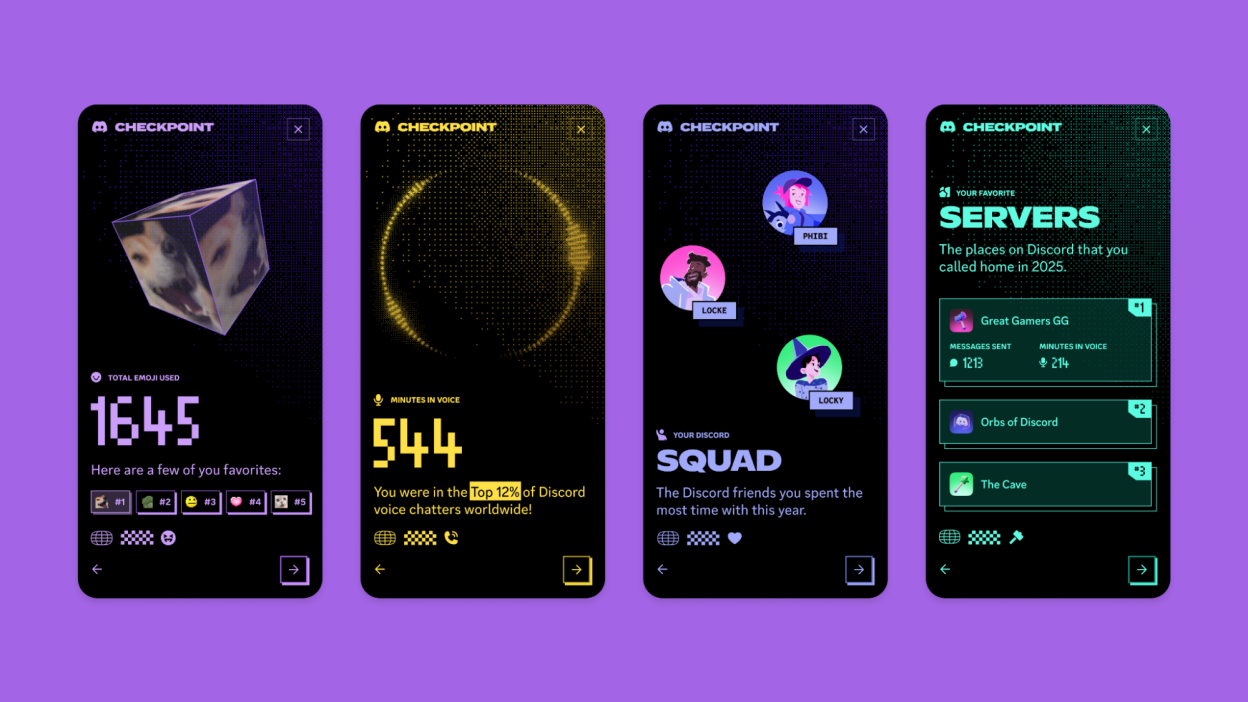
Discord, the popular chat and community platform for gamers, has rolled out a new feature called Checkpoint, giving users a personalized summary of their gaming activity — similar to Spotify Wrapped for music. The feature highlights the games you’ve played, the time spent, and your most active servers over the past year, offering a fun and interactive way to reflect on your gaming habits.
What Is Discord Checkpoint?
Checkpoint provides a visual snapshot of your Discord activity, including:
- Top Games Played: See which games you spent the most hours on.
- Server Engagement: Discover the communities where you were most active.
- Messaging Stats: Track your chat activity, including emojis used and favorite conversation topics.
- Friend Interactions: Review who you interacted with the most over the year.
The feature is designed to be shareable, allowing gamers to post their summaries in servers or social media, creating a community-driven “year in review” experience.
How to Access Your Checkpoint
- Update Discord: Make sure you are using the latest version of the app.
- Go to Your Profile: Tap on your profile picture or avatar.
- Find the Checkpoint Banner: Look for the “Checkpoint” section — usually displayed as a banner or button.
- Explore Your Summary: Click through the interactive graphics to see your personalized stats and highlights.
Discord emphasizes that Checkpoint is optional and respects privacy. Users can control what information is shown and shared, ensuring that only activities you are comfortable revealing appear in your summary.
Why Checkpoint Matters
While primarily a fun and social feature, Checkpoint also provides valuable insights into your gaming habits. It can help you identify patterns, such as which genres you enjoy most, or how your online social interactions change throughout the year. For community managers, the tool can highlight active members and engagement trends.
Checkpoint reflects a broader trend in digital platforms: offering personalized insights to increase user engagement and satisfaction. Just like Spotify Wrapped turned music listening into a yearly ritual, Discord Checkpoint aims to make gaming a shared and celebrated experience.
Tips for Sharing Your Checkpoint
- Share with Friends: Post your summary in your favorite Discord servers to spark conversation.
- Compare Stats: Encourage friends to share theirs and see how your gaming habits differ.
- Highlight Achievements: Celebrate milestones, like your most-played game or highest chat activity.
Whether you’re a casual gamer or a dedicated enthusiast, Discord Checkpoint gives you a unique lens on your digital year, turning your gaming routine into an interactive reflection.













Leave a Reply